> ## Documentation Index
> Fetch the complete documentation index at: https://docs.gitlocalize.com/llms.txt
> Use this file to discover all available pages before exploring further.
# How it works
> The round trip between your repository and GitLocalize, and the segment model everything else is built on.
[GitLocalize](https://gitlocalize.com) is a continuous localization platform. It connects to a GitHub
repository, makes the files in it translatable, tracks how the translations drift from the source as
the source changes, and sends finished translations back as pull requests.
## The round trip
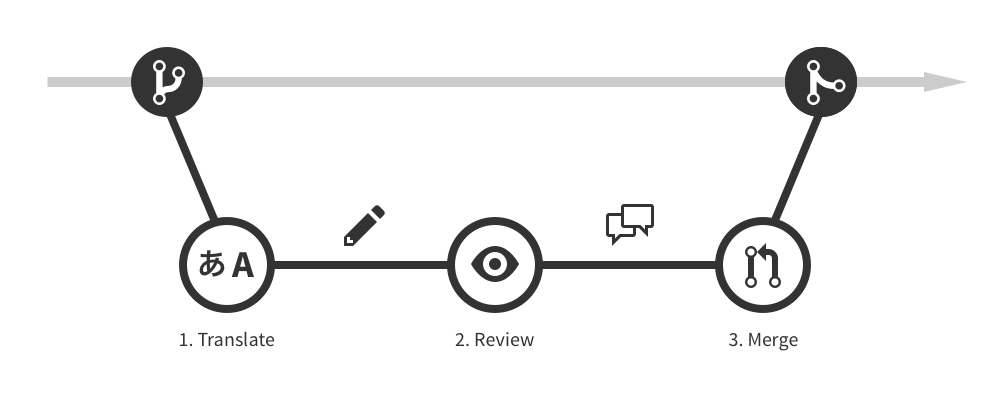 1. GitLocalize pulls source files from the repository, following the configured
[paths](/paths).
2. Translators work on those files in the editor. Each contributor's work becomes their own commit.
3. A finished translation goes to a Language Moderator as a **review request**.
4. Once approved, the moderator opens a **pull request** against the repository.
5. Merging that pull request puts the translation live.
Source files stay under your control in Git the whole time. GitLocalize never writes to the
repository directly — every change arrives as a pull request you review like any other.
## Segments
GitLocalize does not treat a file as one block of text. It parses the file into **segments** —
translatable chunks that can be tracked individually. Markdown, Jupyter Notebook and several other
formats are segmented this way.
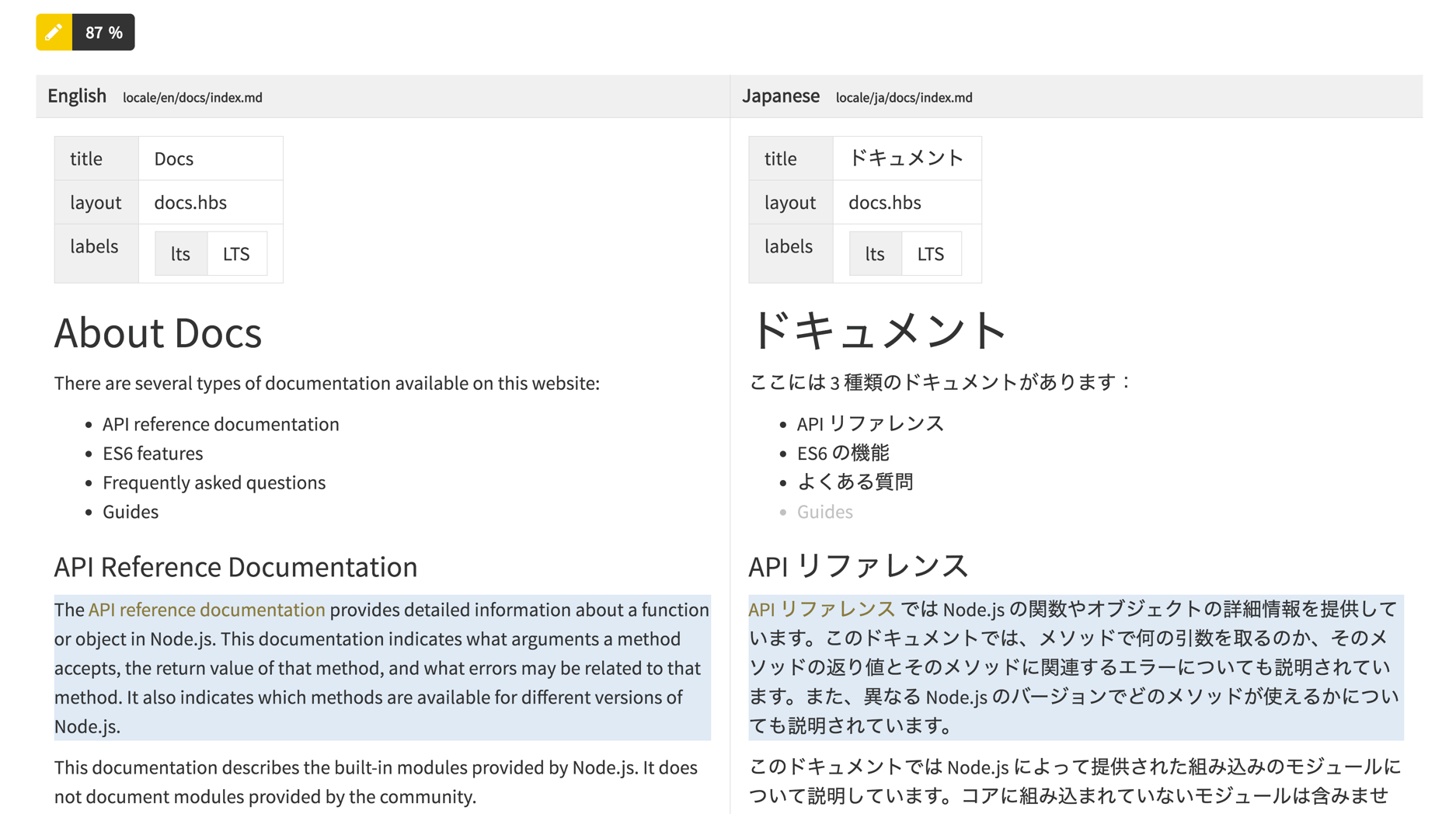
Each segment in a translation file is **linked** to the segment it translates in the source file.
That link is what makes continuous localization work:
* **Progress can be counted.** A file is 60% translated because 60% of its segments have
translations, not because someone estimated it.
* **Changes are localized.** Editing one paragraph in the source marks that one segment as needing
attention, instead of invalidating the whole file.
* **Translators see the pairing.** The editor puts source and translation side by side, segment by
segment, and highlights the ones with nothing on the translation side.
1. GitLocalize pulls source files from the repository, following the configured
[paths](/paths).
2. Translators work on those files in the editor. Each contributor's work becomes their own commit.
3. A finished translation goes to a Language Moderator as a **review request**.
4. Once approved, the moderator opens a **pull request** against the repository.
5. Merging that pull request puts the translation live.
Source files stay under your control in Git the whole time. GitLocalize never writes to the
repository directly — every change arrives as a pull request you review like any other.
## Segments
GitLocalize does not treat a file as one block of text. It parses the file into **segments** —
translatable chunks that can be tracked individually. Markdown, Jupyter Notebook and several other
formats are segmented this way.
Each segment in a translation file is **linked** to the segment it translates in the source file.
That link is what makes continuous localization work:
* **Progress can be counted.** A file is 60% translated because 60% of its segments have
translations, not because someone estimated it.
* **Changes are localized.** Editing one paragraph in the source marks that one segment as needing
attention, instead of invalidating the whole file.
* **Translators see the pairing.** The editor puts source and translation side by side, segment by
segment, and highlights the ones with nothing on the translation side.
 When GitLocalize imports translations that already exist in your repository, it tries to link each of
their segments to a source segment automatically. Segments it cannot match become
[conflicts](/conflicts).
### Segment states
Statistics count segments in these states, by characters and by words:
| State | Meaning |
| ------------ | --------------------------------------------- |
| Untranslated | No translation submitted |
| Translated | A translation exists |
| Unapproved | Translated, still awaiting moderator review |
| Approved | Reviewed and approved by a Language Moderator |
See [Statistics](/statistics) for where these are reported.
## Where to go next
Connect a repository and translate a first file.
The form fields, private repositories, and what happens after.
When GitLocalize imports translations that already exist in your repository, it tries to link each of
their segments to a source segment automatically. Segments it cannot match become
[conflicts](/conflicts).
### Segment states
Statistics count segments in these states, by characters and by words:
| State | Meaning |
| ------------ | --------------------------------------------- |
| Untranslated | No translation submitted |
| Translated | A translation exists |
| Unapproved | Translated, still awaiting moderator review |
| Approved | Reviewed and approved by a Language Moderator |
See [Statistics](/statistics) for where these are reported.
## Where to go next
Connect a repository and translate a first file.
The form fields, private repositories, and what happens after.