> ## Documentation Index
> Fetch the complete documentation index at: https://docs.gitlocalize.com/llms.txt
> Use this file to discover all available pages before exploring further.
# Conflicts
> Why imported translation segments fail to match their source, and how to link or remove them.
A **conflict** is a translation segment GitLocalize could not match to a segment in the source file.
Conflicts are highlighted in red, and any file containing one is marked **Conflicting**.
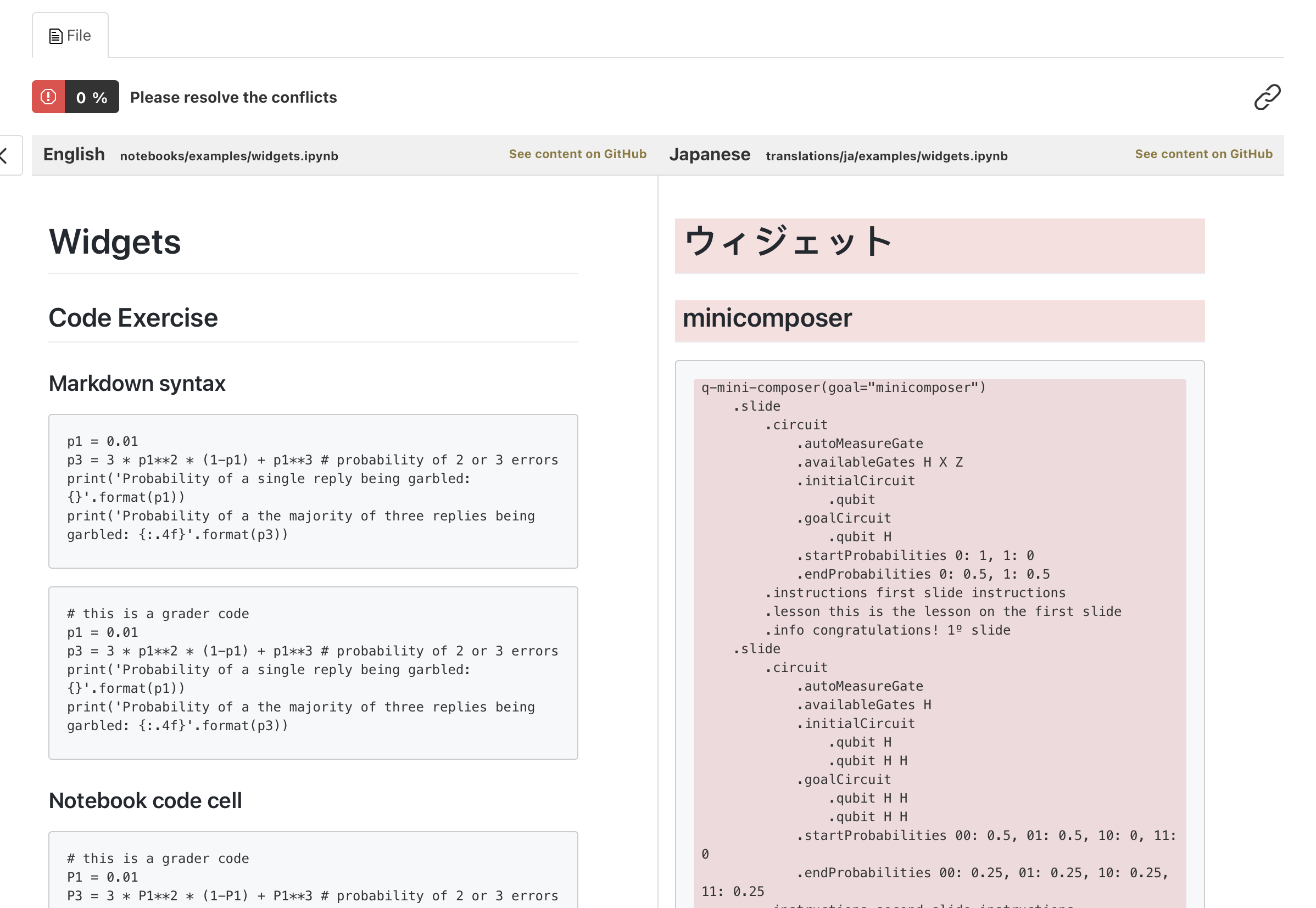 Conflicts arise on import. When a repository is [synced](/syncing), GitLocalize parses existing
translation files alongside the source files and attempts to link each translation
[segment](/how-it-works#segments) to the source segment it translates. Segments left unlinked become
conflicts.
## Why matching fails
| Cause | Example |
| ------------------------- | ------------------------------------------------------------------------------------ |
| Structure differs | The translation is outdated and has fewer, more, or reordered blocks than the source |
| Formatting differs | Same text, but different header levels, list types, or bold/italic markup |
| Notebook metadata differs | In Jupyter Notebooks, segment IDs or cell metadata don't match |
A conflict means the pairing is uncertain — not that the translation is wrong. Resolving one is a
matter of telling GitLocalize which source segment it belongs to, or removing it if it is obsolete.
## Resolving a conflict
Click a red segment in the translation pane.
The source pane becomes selectable.
Select the segment in the source pane that this translation corresponds to.
Conflicts arise on import. When a repository is [synced](/syncing), GitLocalize parses existing
translation files alongside the source files and attempts to link each translation
[segment](/how-it-works#segments) to the source segment it translates. Segments left unlinked become
conflicts.
## Why matching fails
| Cause | Example |
| ------------------------- | ------------------------------------------------------------------------------------ |
| Structure differs | The translation is outdated and has fewer, more, or reordered blocks than the source |
| Formatting differs | Same text, but different header levels, list types, or bold/italic markup |
| Notebook metadata differs | In Jupyter Notebooks, segment IDs or cell metadata don't match |
A conflict means the pairing is uncertain — not that the translation is wrong. Resolving one is a
matter of telling GitLocalize which source segment it belongs to, or removing it if it is obsolete.
## Resolving a conflict
Click a red segment in the translation pane.
The source pane becomes selectable.
Select the segment in the source pane that this translation corresponds to.
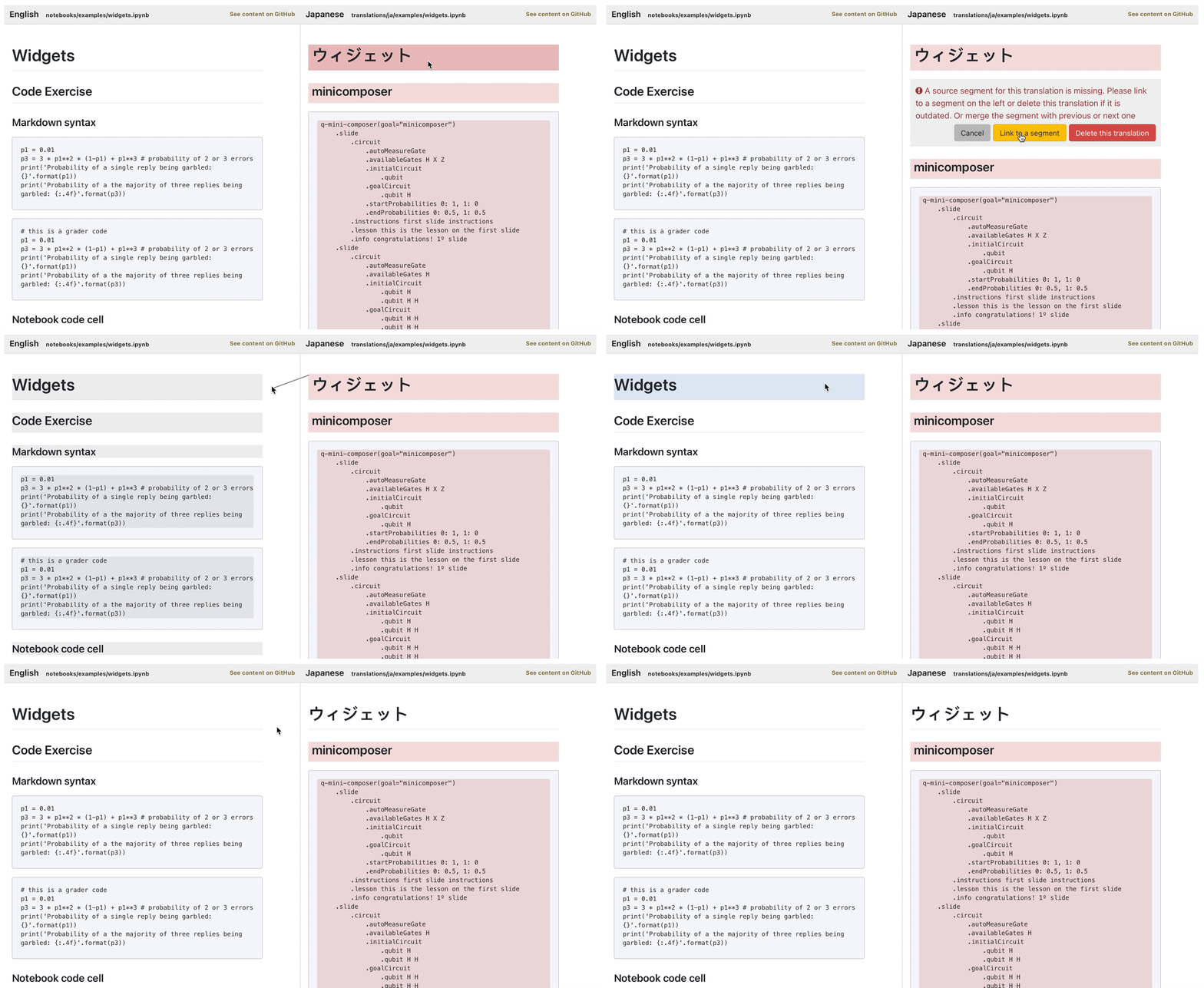 Verify the translation is current before linking it — linking an outdated translation marks that
segment as done and hides it from everyone who might otherwise have fixed it. Obsolete segments
should be removed with **Delete this translation** instead.
A file becomes translatable again once every conflict in it has been linked or deleted.
Verify the translation is current before linking it — linking an outdated translation marks that
segment as done and hides it from everyone who might otherwise have fixed it. Obsolete segments
should be removed with **Delete this translation** instead.
A file becomes translatable again once every conflict in it has been linked or deleted.